

- HTML Comments Tutorial | Convert Comments into HTML Codes
- Data Structure and Algorithms Tutorial | Ultimate Guide to Learn
- Gradle Tutorial | For Beginners [ STEP-IN ]
- Encapsulation In Java | Complete Tutorial With Examples
- What is Release Management? | A Comprehensive Tutorial for Beginners
- OOPs Concepts in Java | Learn from Basics with Examples
- The Top Basic Tools of Quality Tutorial | The Ultimate Guide
- Set Environment for C# – Learn How to Setup through this Tutorial
- C# Vs Java Tutorial | Overview and Key Difference
- List of IDEs to run C# Programs | Tutorial for Learning Path
- C Sharp Variables and Constants | The Ultimate Guide
- Unsafe Code in C-Sharp Tutorial | Everything You Need to Know
- Type Conversion Method in C# | A Complete Tutorial
- What Is Synchronization in c# Tutorial | The BEST Step-By-Step Guide
- Understanding Structures in C# | Learn in 1 Day FREE Tutorial
- Strings – C# Tutorial | A Definitive Programming Guide
- Static Keyword in C# Tutorial | Learn with Examples
- Stack Collection in C# Tutorial | A Definitive Guide for Beginners
- C# Sorted List Tutorial with Examples | Learn in 1 Day FREE
- C# Serialization Tutorial | Ultimate Guide to Learn [BEST & NEW]
- Regular Expression in C# Tutorial | Everything You Need to Know
- What is Reflection in C#? | Learn Now Tutorial
- Queue Collection in C# Tutorial | A Definitive Guide
- Properties in C# | The complete Tutorial
- C# Preprocessor Directives Tutorial | Learn in 1 Day FREE
- Polymorphism C# Tutorial | The Ultimate Guide
- C# Operators Tutorial | Learn Arithmetic, Comparison, Logical Concepts
- Namespaces – The complete C# Tutorial
- Multithreading in C# Tutorial | Learn With Examples and Advantages
- Methods – C# Tutorial | A Complete Programming Guide
- Linked List Implementation in C# Tutorial | Ultimate Guide to Learn [UPDATED]
- Introduction to C# Tutorial | Guide for Beginners
- What is Interface in C# | A Defined Free Tutorial
- C# Inheritance Tutorial | A Complete Free Tutorial
- Indexers in C# Tutorial | A Complete Programming Guide
- HashSet Collection in C# Tutorial | Complete Guide Tutorial For Free
- Generics in C# Tutorial | Learn Generic Classes and Methods
- Creating Your First C# Program Tutorial | Learn in 1 Day
- Basics of File Handling in C# Tutorial | The Ultimate Guide
- C# Exception Handling Tutorial | Learn with Best Practices
- Events – C# Tutorial | A Complete Programming Guide
- C# Enumerations Type Tutorial | Learn Everything about Enum
- Dictionary Collection in C# | Ultimate Guide to Learn [NEW & UPDATED]
- Delegates – C# Programming Guide | The Ultimate Guide for Beginners
- Understanding Decision Making Statements in C# | Learn Now Tutorial
- Classes and Objects – C# Fundamentals Tutorial
- C# BitArray Collection Tutorial | Learn in 1 Day FREE
- Attributes in C# Tutorial | Learn to work with attributes in C#
- C# Array Tutorial | Create, Declare, Initialize
- ArrayList Collection on in C# | A Complete tutorial For Beginners
- Anonymous Methods and Lambdas – C# Tutorial | A Complete Guide
- Abstraction in C# Tutorial – Learn the Abstract class and Interface
- Game Development using Unity 3D Tutorial | Ultimate Guide to Learn [UPDATED]
- C++ Reference Tutorial | A Comprehensive Guide for Beginners
- PHP vs Python | Which Is Better For Web Development
- C++ Constructors Tutorial: Types and Copy Constructors
- JavaScript Arrays Tutorial | Complete Beginner’s Guide
- What Is Maven | Maven Tutorial For Beginners
- Spring Tutorial | Perfect Guide for Beginners
- React Hooks Tutorial for Beginners | Ultimate Guide to Learn
- Python for Data Science Tutorial | Quickstart : A Complete Guide
- What is Golang? : A tutorial for beginners | Get started
- Hibernate Validator Tutorial | Learn in 1 Day FREE
- Postman Tutorial for Beginners: API Testing using Postman | A Complete Guide
- Akka Tutorial
- J2EE | Web Development Tutorial for Beginners
- Scala Exception Handling Tutorial | Learn in 1 Day [ STEP-IN ]
- Web development Tutorial
- Visual Studio Tutorial
- PyGame Tutorial
- Python Anaconda Tutorial
- Python Scikit-Learn Cheat Sheet Tutorial
- Mean Stack Tutorial
- Python Requests Tutorial
- Advanced Java Tutorial
- Spring Boot Microservices Tutorial
- Java Servlets Tutorial
- How to Install Pycharm
- Pycharm Tutorial
- Python Version Tutorial
- Python strings
- How to Download Python
- C Data Types Tutorial
- arrays in python
- Python While Loop Tutorial
- JAVA Tutorial
- Loops In C Tutorial
- Java File I/O Tutorial
- Variables in Python Tutorial
- Python Tutorial
- Python Pandas Cheat Sheet Tutorial
- Data Structures Cheat Sheet with Python Tutorial
- Python Tuples Tutorial
- Python If Else Statements Tutorial
- Python Functions Tutorial
- HTML Comments Tutorial | Convert Comments into HTML Codes
- Data Structure and Algorithms Tutorial | Ultimate Guide to Learn
- Gradle Tutorial | For Beginners [ STEP-IN ]
- Encapsulation In Java | Complete Tutorial With Examples
- What is Release Management? | A Comprehensive Tutorial for Beginners
- OOPs Concepts in Java | Learn from Basics with Examples
- The Top Basic Tools of Quality Tutorial | The Ultimate Guide
- Set Environment for C# – Learn How to Setup through this Tutorial
- C# Vs Java Tutorial | Overview and Key Difference
- List of IDEs to run C# Programs | Tutorial for Learning Path
- C Sharp Variables and Constants | The Ultimate Guide
- Unsafe Code in C-Sharp Tutorial | Everything You Need to Know
- Type Conversion Method in C# | A Complete Tutorial
- What Is Synchronization in c# Tutorial | The BEST Step-By-Step Guide
- Understanding Structures in C# | Learn in 1 Day FREE Tutorial
- Strings – C# Tutorial | A Definitive Programming Guide
- Static Keyword in C# Tutorial | Learn with Examples
- Stack Collection in C# Tutorial | A Definitive Guide for Beginners
- C# Sorted List Tutorial with Examples | Learn in 1 Day FREE
- C# Serialization Tutorial | Ultimate Guide to Learn [BEST & NEW]
- Regular Expression in C# Tutorial | Everything You Need to Know
- What is Reflection in C#? | Learn Now Tutorial
- Queue Collection in C# Tutorial | A Definitive Guide
- Properties in C# | The complete Tutorial
- C# Preprocessor Directives Tutorial | Learn in 1 Day FREE
- Polymorphism C# Tutorial | The Ultimate Guide
- C# Operators Tutorial | Learn Arithmetic, Comparison, Logical Concepts
- Namespaces – The complete C# Tutorial
- Multithreading in C# Tutorial | Learn With Examples and Advantages
- Methods – C# Tutorial | A Complete Programming Guide
- Linked List Implementation in C# Tutorial | Ultimate Guide to Learn [UPDATED]
- Introduction to C# Tutorial | Guide for Beginners
- What is Interface in C# | A Defined Free Tutorial
- C# Inheritance Tutorial | A Complete Free Tutorial
- Indexers in C# Tutorial | A Complete Programming Guide
- HashSet Collection in C# Tutorial | Complete Guide Tutorial For Free
- Generics in C# Tutorial | Learn Generic Classes and Methods
- Creating Your First C# Program Tutorial | Learn in 1 Day
- Basics of File Handling in C# Tutorial | The Ultimate Guide
- C# Exception Handling Tutorial | Learn with Best Practices
- Events – C# Tutorial | A Complete Programming Guide
- C# Enumerations Type Tutorial | Learn Everything about Enum
- Dictionary Collection in C# | Ultimate Guide to Learn [NEW & UPDATED]
- Delegates – C# Programming Guide | The Ultimate Guide for Beginners
- Understanding Decision Making Statements in C# | Learn Now Tutorial
- Classes and Objects – C# Fundamentals Tutorial
- C# BitArray Collection Tutorial | Learn in 1 Day FREE
- Attributes in C# Tutorial | Learn to work with attributes in C#
- C# Array Tutorial | Create, Declare, Initialize
- ArrayList Collection on in C# | A Complete tutorial For Beginners
- Anonymous Methods and Lambdas – C# Tutorial | A Complete Guide
- Abstraction in C# Tutorial – Learn the Abstract class and Interface
- Game Development using Unity 3D Tutorial | Ultimate Guide to Learn [UPDATED]
- C++ Reference Tutorial | A Comprehensive Guide for Beginners
- PHP vs Python | Which Is Better For Web Development
- C++ Constructors Tutorial: Types and Copy Constructors
- JavaScript Arrays Tutorial | Complete Beginner’s Guide
- What Is Maven | Maven Tutorial For Beginners
- Spring Tutorial | Perfect Guide for Beginners
- React Hooks Tutorial for Beginners | Ultimate Guide to Learn
- Python for Data Science Tutorial | Quickstart : A Complete Guide
- What is Golang? : A tutorial for beginners | Get started
- Hibernate Validator Tutorial | Learn in 1 Day FREE
- Postman Tutorial for Beginners: API Testing using Postman | A Complete Guide
- Akka Tutorial
- J2EE | Web Development Tutorial for Beginners
- Scala Exception Handling Tutorial | Learn in 1 Day [ STEP-IN ]
- Web development Tutorial
- Visual Studio Tutorial
- PyGame Tutorial
- Python Anaconda Tutorial
- Python Scikit-Learn Cheat Sheet Tutorial
- Mean Stack Tutorial
- Python Requests Tutorial
- Advanced Java Tutorial
- Spring Boot Microservices Tutorial
- Java Servlets Tutorial
- How to Install Pycharm
- Pycharm Tutorial
- Python Version Tutorial
- Python strings
- How to Download Python
- C Data Types Tutorial
- arrays in python
- Python While Loop Tutorial
- JAVA Tutorial
- Loops In C Tutorial
- Java File I/O Tutorial
- Variables in Python Tutorial
- Python Tutorial
- Python Pandas Cheat Sheet Tutorial
- Data Structures Cheat Sheet with Python Tutorial
- Python Tuples Tutorial
- Python If Else Statements Tutorial
- Python Functions Tutorial
Python strings
Last updated on 10th Oct 2020, Blog, Software Engineering, Tutorials
 (5.0) | 12547 Ratings 2955
 What is String in Python?
A string is a sequence of characters.
A character is simply a symbol. For example, the English language has 26 characters.
Computers do not deal with characters, they deal with numbers (binary). Even though you may see characters on your screen, internally it is stored and manipulated as a combination of 0s and 1s.
This conversion of character to a number is called encoding, and the reverse process is decoding. ASCII and Unicode are some of the popular encodings used.
In Python, a string is a sequence of Unicode characters. Unicode was introduced to include every character in all languages and bring uniformity in encoding. You can learn about Unicode from Python Unicode.
Subscribe For Free Demo
Error: Contact form not found.
How to create a string in Python?
Strings can be created by enclosing characters inside a single quote or double-quotes. Even triple quotes can be used in Python but generally used to represent multiline strings and docstrings.
# defining strings in Python
# all of the following are equivalent
- my_string = ‘Hello’
- print(my_string)
- my_string = “Hello”
- print(my_string)
- my_string = ”’Hello”’
- print(my_string)
# triple quotes string can extend multiple lines
- my_string = “””Hello, welcome to
- the world of Python”””
- print(my_string)
When you run the program, the output will be:
Hello
Hello
Hello
Hello, welcome to
the world of Python
How to access characters in a string?
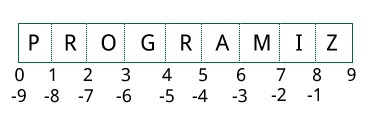
We can access individual characters using indexing and a range of characters using slicing. Index starts from 0. Trying to access a character out of index range will raise an IndexError. The index must be an integer. We can’t use floats or other types, this will result into TypeError.
Python allows negative indexing for its sequences.
The index of -1 refers to the last item, -2 to the second last item and so on. We can access a range of items in a string by using the slicing operator :(colon).
- #Accessing string characters in Python
- str = ‘programiz’
- print(‘str = ‘, str)
- #first character
- print(‘str[0] = ‘, str[0])
- #last character
- print(‘str[-1] = ‘, str[-1])
- #slicing 2nd to 5th character
- print(‘str[1:5] = ‘, str[1:5])
- #slicing 6th to 2nd last character
- print(‘str[5:-2] = ‘, str[5:-2])
When we run the above program, we get the following output:
str = programiz
str[0] = p
str[-1] = z
str[1:5] = rogr
str[5:-2] = am
If we try to access an index out of the range or use numbers other than an integer, we will get errors.
# index must be in range
- >>> my_string[15]
- …
IndexError: string index out of range
# index must be an integer
- >>> my_string[1.5]
- …
TypeError: string indices must be integers
Slicing can be best visualized by considering the index to be between the elements as shown below.
If we want to access a range, we need the index that will slice the portion from the string.
How to change or delete a string?
Strings are immutable. This means that elements of a string cannot be changed once they have been assigned. We can simply reassign different strings to the same name.
- >>> my_string = ‘programiz’
- >>> my_string[5] = ‘a’
- …
TypeError: ‘str’ object does not support item assignment
- >>> my_string = ‘Python’
- >>> my_string
- ‘Python’
We cannot delete or remove characters from a string. But deleting the string entirely is possible using the del keyword.
- >>> del my_string[1]
- …
TypeError: ‘str’ object doesn’t support item deletion
- >>> del my_string
- >>> my_string
- …
NameError: name ‘my_string’ is not defined
Python String Operations
There are many operations that can be performed with strings which makes it one of the most used data types in Python.
Concatenation of Two or More Strings
Joining of two or more strings into a single one is called concatenation.
The + operator does this in Python. Simply writing two string literals together also concatenates them.
The * operator can be used to repeat the string for a given number of times.
# Python String Operations
- str1 = ‘Hello’
- str2 =’World!’
- # using +
- print(‘str1 + str2 = ‘, str1 + str2)
- # using *
- print(‘str1 * 3 =’, str1 * 3)
When we run the above program, we get the following output:
str1 + str2 = HelloWorld!
str1 * 3 = HelloHelloHello
Writing two string literals together also concatenates them like + operator.
If we want to concatenate strings in different lines, we can use parentheses.
- >>> # two string literals together
- >>> ‘Hello ”World!’
- ‘Hello World!’
- >>> # using parentheses
- >>> s = (‘Hello ‘
- … ‘World’)
- >>> s
- ‘Hello World’
Iterating Through a string
We can iterate through a string using a for loop. Here is an example to count the number of ‘l’s in a string.
# Iterating through a string
- count = 0
- for letter in ‘Hello World’:
- if(letter == ‘l’):
- count += 1
- print(count,’letters found’)
When we run the above program, we get the following output:
3 letters found
String Membership Test
We can test if a substring exists within a string or not, using the keyword in.
- >>> ‘a’ in ‘program’
- True
- >>> ‘at’ not in ‘battle’
- False
Built-in functions to Work with Python
Various built-in functions that work with sequence work with strings as well.
Some of the commonly used ones are enumerate() and len(). The enumerate() function returns an enumerate object. It contains the index and value of all the items in the string as pairs. This can be useful for iteration.
Similarly, len() returns the length (number of characters) of the string.
str = ‘cold’
# enumerate()
- list_enumerate = list(enumerate(str))
- print(‘list(enumerate(str) = ‘, list_enumerate)
- #character count
- print(‘len(str) = ‘, len(str))
When we run the above program, we get the following output:
list(enumerate(str) = [(0, ‘c’), (1, ‘o’), (2, ‘l’), (3, ‘d’)]
len(str) = 4
Python String Formatting
Escape Sequence
If we want to print a text like He said, “What’s there?”, we can neither use single quotes nor double quotes. This will result in a SyntaxError as the text itself contains both single and double quotes.
- >>> print(“He said, “What’s there?””)
- …
- SyntaxError: invalid syntax
- >>> print(‘He said, “What’s there?”‘)
- …
- SyntaxError: invalid syntax
One way to get around this problem is to use triple quotes. Alternatively, we can use escape sequences.
An escape sequence starts with a backslash and is interpreted differently. If we use a single quote to represent a string, all the single quotes inside the string must be escaped. Similar is the case with double quotes. Here is how it can be done to represent the above text.
- # using triple quotes
- print(”’He said, “What’s there?””’)
- # escaping single quotes
- print(‘He said, “What\’s there?”‘)
- # escaping double quotes
- print(“He said, \”What’s there?\””)
When we run the above program, we get the following output:
He said, “What’s there?”
He said, “What’s there?”
He said, “What’s there?”
Here is a list of all the escape sequences supported by Python.
| Escape Sequence | Description |
|---|---|
| \newline | Backslash and newline ignored |
| \\ | Backslash |
| \’ | Single quote |
| \” | Double quote |
| \a | ASCII Bell |
| \b | ASCII Backspace |
| \f | ASCII Formfeed |
| \n | ASCII Linefeed |
| \r | ASCII Carriage Return |
| \t | ASCII Horizontal Tab |
| \v | ASCII Vertical Tab |
| \ooo | Character with octal value ooo |
| \xHH | Character with hexadecimal value HH |
Here are some examples
- >>> print(“C:\\Python32\\Lib”)
- C:\Python32\Lib
- >>> print(“This is printed\nin two lines”)
- This is printed
- in two lines
- >>> print(“This is \x48\x45\x58 representation”)
This is HEX representation
Raw String to ignore escape sequence
Sometimes we may wish to ignore the escape sequences inside a string. To do this we can place r or R in front of the string. This will imply that it is a raw string and any escape sequence inside it will be ignored.
- >>> print(“This is \x61 \ngood example”)
- This is a
- good example
- >>> print(r”This is \x61 \ngood example”)
This is \x61 \ngood example
The format() Method for Formatting Strings
The format() method that is available with the string object is very versatile and powerful in formatting strings. Format strings contain curly braces {} as placeholders or replacement fields which get replaced.
We can use positional arguments or keyword arguments to specify the order.
- # Python string format() method
- # default(implicit) order
- default_order = “{}, {} and {}”.format(‘John’,’Bill’,’Sean’)
- print(‘\n— Default Order —‘)
- print(default_order)
- # order using positional argument
- positional_order = “{1}, {0} and {2}”.format(‘John’,’Bill’,’Sean’)
- print(‘\n— Positional Order —‘)
- print(positional_order)
- # order using keyword argument
- keyword_order = “{s}, {b} and {j}”.format(j=’John’,b=’Bill’,s=’Sean’)
- print(‘\n— Keyword Order —‘)
- print(keyword_order)
When we run the above program, we get the following output:
— Default Order —
John, Bill and Sean
— Positional Order —
Bill, John and Sean
— Keyword Order —
Sean, Bill and John
The format() method can have optional format specifications. They are separated from the field name using colon. For example, we can left-justify <, right-justify > or center ^ a string in the given space.
We can also format integers as binary, hexadecimal, etc. and floats can be rounded or displayed in the exponent format. There are tons of formatting you can use. Visit here for all the string formatting available with the format() method.
- >>> # formatting integers
- >>> “Binary representation of {0} is {0:b}”.format(12)
‘Binary representation of 12 is 1100’
- >>> # formatting floats
- >>> “Exponent representation: {0:e}”.format(1566.345)
‘Exponent representation: 1.566345e+03’
- >>> # round off
- >>> “One third is: {0:.3f}”.format(1/3)
‘One third is: 0.333’
- >>> # string alignment
- >>> “|{:<10}|{:^10}|{:>10}|”.format(‘butter’,’bread’,’ham’)
‘|butter | bread | ham|’
Old style formatting
We can even format strings like the old sprintf() style used in C programming language. We use the % operator to accomplish this.
- >>> x = 12.3456789
- >>> print(‘The value of x is %3.2f’ %x)
The value of x is 12.35
- >>> print(‘The value of x is %3.4f’ %x)
The value of x is 12.3457
Common Python String Methods
There are numerous methods available with the string object. The format() method that we mentioned above is one of them. Some of the commonly used methods are lower(), upper(), join(), split(), find(), replace() etc. Here is a complete list of all the built-in methods to work with strings in Python.
- >>> “PrOgRaMiZ”.lower()
- ‘programiz’
- >>> “PrOgRaMiZ”.upper()
- ‘PROGRAMIZ’
- >>> “This will split all words into a list”.split()
- [‘This’, ‘will’, ‘split’, ‘all’, ‘words’, ‘into’, ‘a’, ‘list’]
- >>> ‘ ‘.join([‘This’, ‘will’, ‘join’, ‘all’, ‘words’, ‘into’, ‘a’, ‘string’])
- ‘This will join all words into a string’
- >>> ‘Happy New Year’.find(‘ew’)
- 7
- >>> ‘Happy New Year’.replace(‘Happy’,’Brilliant’)
- ‘Brilliant New Year’

